Segment 1M customers from 10M transactions (640MB CSV) with natural language queries / Text-to-SQL - entirely in your browser. No server. No remote database. No IT approvals.
Published: November 26, 2025
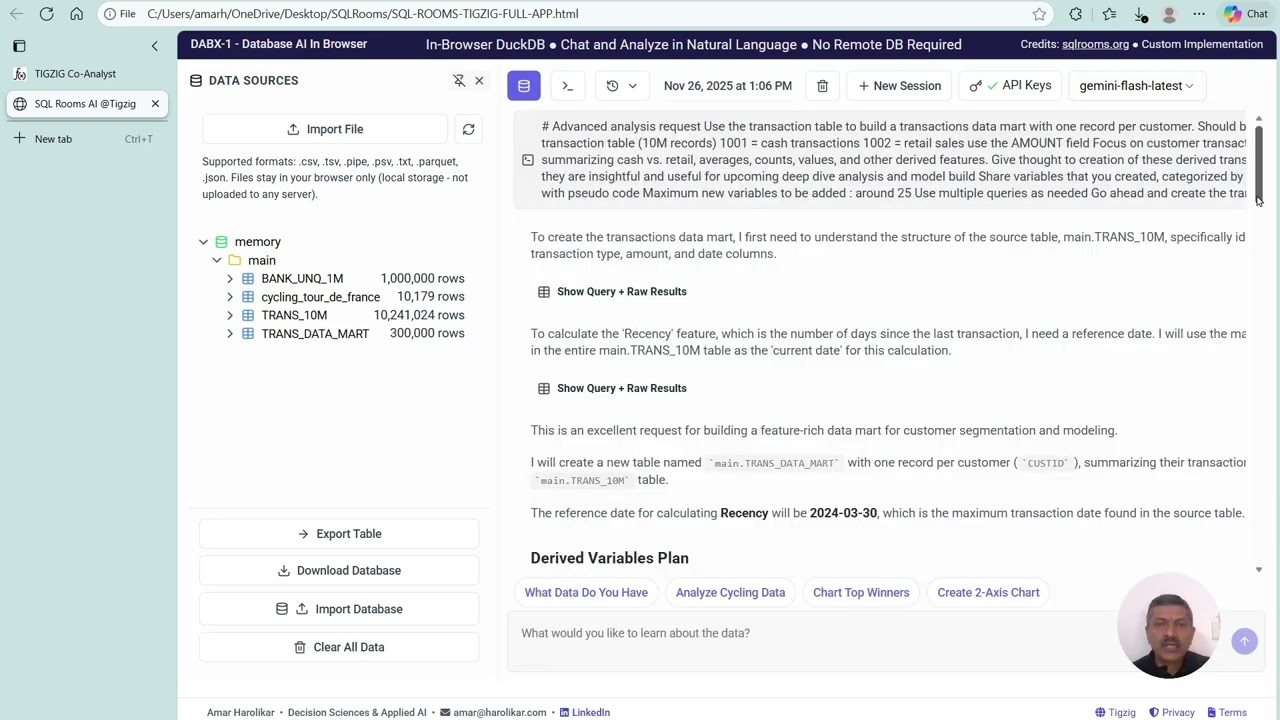
Process multi-GB files, build datamarts, and run AI-powered analysis entirely in your browser with DuckDB + text-to-SQL AI. When server deployment isn't an option - or will take 6 months and $1M in approvals - this runs off a single HTML file on your laptop.
DABX-1 (Database AI, Browser, eXtended) - built on SQL Rooms (sqlrooms.org) by Ilya Boyandin, customized for analytics workflows that need to move fast without infrastructure headaches.
Live at www.tigzig.com/sql-rooms. Or download the full app as a single 3.5MB HTML file and run it locally.
Two Core Value Propositions
1. Local Browser Execution = Data Privacy
Your data never leaves your machine. Files import directly into DuckDB running in the browser. No uploads to remote servers. No cloud storage. API calls go to the LLM for query generation, but your actual data stays local.
2. Single-File Deployment = Zero Infrastructure
Where traditional deployment requires server provisioning, security reviews, and IT approvals - this bypasses all of it. Download one HTML file. Double-click. You're running a full AI-powered analytics app. Share it like you share Excel tools: email it, put it on a shared drive, run it off your laptop.
Who This Is For
- Analysts in environments where you need to work with data locally without remote databases
- Teams with no server access where IT says deployment will take months or isn't possible at all.
- Fast prototyping scenarios where you need answers this week, not next quarter.
Real-World Usage
One client's finance team uses this exact single-file app to process weekly reports. Multiple CSVs previously handled through Excel pivot tables and VLOOKUPs now run through a multi-step AI process with validation built in. Output: clean CSV ready for final Excel pivot analysis. No server. No deployment approvals. Just the HTML file on their shared drive.
What I Built vs. The Original SQL Rooms
SQL Rooms (sqlrooms.org) provides the foundation: DuckDB in browser + AI text-to-SQL interface.
My customizations:
- Expanded file type support: CSV, TSV, pipe-delimited, plus intelligent delimiter detection
- Export capabilities: Export individual tables or entire databases. Build intermediate work products, export them, share them.
- Iterative debugging with AI: API errors and query failures now get passed back to the AI agent with context for self-correction across multiple steps. Added guidance for typical errors and debugging protocols. If it stops mid-process, prompt it to continue debugging.
- AI-driven schema detection: The AI examines schema before running queries, reducing manual setup.
- Database management: Clear all tables and start fresh when needed.
Example Workflow: Building Transaction and Customer Datamarts
Imported 1M customer records and 10M transaction records (650MB CSV) into browser-based DuckDB. Had AI create ~25 feature from raw transactions, put that into a transactions datamart of one row per customer, merge with the customer data to create customer datamart and generate a segmented profile report with 40+ KPIs and charts. Natural language queries throughout.
Two Deployment Options
Server-based deployment - For larger teams operating within corporate VPNs. Deploy once, multiple users access via internal URL. Suitable when you have infrastructure but need fast AI-powered querying without building custom applications
Non-server deployment - For environments where server deployment isn't approved or feasible. Download the 3.5MB HTML file. Run it locally. Share via email or shared drives. No installation, no backend, no IT tickets.
Decision criteria: Small team with no IT support or data privacy requirements? Non-server. Multi-department deployment with existing infrastructure and data governance protocols? Server-based.
Real-World Caveats
This demonstration uses clean synthetic data to show tool capability and workflow concept. Real-world analytics always requires iterations, data cleaning, validation, and error handling. No tool - AI or otherwise - delivers production-ready analysis in one click. This app provides the framework and capability. You bring domain knowledge, validation discipline, and iterative refinement. That's how live analytics works.
Try It
Use the deployed version or download the bundled single-file app.
Get started in 3 steps:
- Get a free Gemini API key from aistudio.google.com (takes 2 minutes)
- Load the demo datasets or upload your own files
- Run your first natural language query
Test datasets available: Customer and transaction files (1M + 10M records) on my Google Drive (link in Resources section below).
Sample Prompts and Results
Prompt 1: Build Transaction Datamart
Use the transaction table to build a transactions datamart with one record per customer. Should be a NEW TABLE.
In the transaction table (10M records):
- 1001 = cash transactions
- 1002 = retail sales
- use the AMOUNT field
Focus on customer transaction behavior, summarizing cash vs. retail, averages, counts, values, and other derived features. Give thought to creation of these derived transaction variables so that they are insightful and useful for upcoming deep dive analysis and model build.
Share variables that you created, categorized by intuitive categories along with pseudo code.
Maximum new variables to be added: around 25. Use multiple queries as needed.
Go ahead and create the trans datamart table.
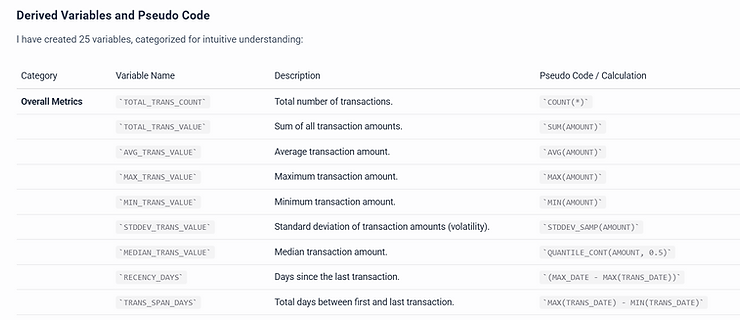
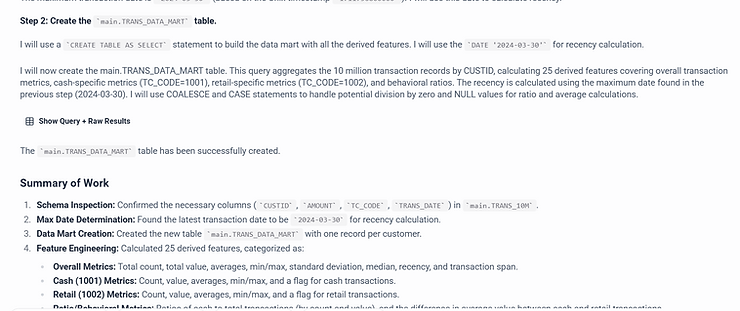
Prompt 2: Customer Profile Report
Now next step: There is a customer file. Create a new customer datamart by merging the customer data with this transaction datamart.
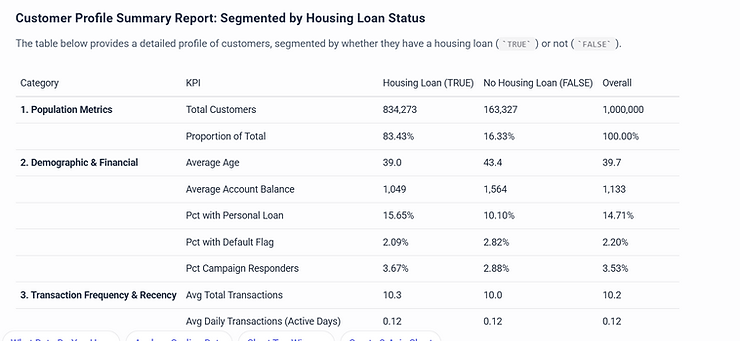
Then generate a customer profile summary report based on this customer datamart, providing an overview of customer characteristics. Break it down by housing variables to offer insights at both the overall and segmented levels.
Incorporate as many relevant features from the datamart as feasible to create a clear snapshot of customer profiles. Make sure that the profile report has at least 40 KPIs properly grouped into categories.
Share in a nicely formatted table format - vertical format with housing segment in columns and the KPIs in rows.
Also share 3 insightful charts based on the final profile summary that you create.
Customize It
Source code: Hit 'Docs' on the app site (www.tigzig.com/sql-rooms)
Work with your AI Coder (Cursor, Claude Code, Gemini CLI) to customize for your specific workflows. The GitHub repo includes architecture documentation explaining modifications and deployment details for quick reuse.
How It Compares to My Other Database AI Tools
This is one of 10 open-source Database AI micro-apps I've built, each serving different deployment scenarios:
- DATS-4 www.tigzig.com/analyzer - React UI connecting to remote databases (PostgreSQL, MySQL). Handles situations where you have database infrastructure and need team-wide access. If uploading files, creates temporary tables on remote database.
- ChatGPT + Database connectors: For rapid deployment where ChatGPT interface is acceptable. Direct database connections with minimal setup.
- Flowise AI solutions: Provides both backend and frontend. Native Flowise interface connects to databases for teams already using Flowise workflows.
- This tool (DABX-1): For local execution, data privacy, and zero-infrastructure deployment. When remote databases aren't an option or you need offline capability.
These tools are complementary. Use based on your infrastructure constraints, privacy requirements, and deployment timelines.
All tools available at www.tigzig.com
Technical Note: Is It 100% Local?
- File data: Remains in browser's DuckDB instance. Never uploaded.
- LLM receives: Schema, sample rows, and query results for generating SQL. Not your full dataset.
- API calls: Go directly from browser to LLM (Gemini, OpenAI, Claude).
- Can it be 100% offline? Yes. The original SQL Rooms repo supports Ollama for fully offline LLM use.
Memory and Performance Limits
Handles multiple files of a few hundred MBs to GB+ with ease. For larger volumes, performance depends on your device memory. DuckDB-WASM defaults can be tuned if your hardware supports it.
Resources
- Source code and docs: github.com/amararun/sql-rooms-tigzig-final
- Docs also accessible via app - 'Docs' tab
- Test datasets (Google Drive): 1M customer + 10M transaction records
- Original SQL Rooms project (credit): sqlrooms.org by Ilya Boyandin
Working on something similar? How I work covers the rates, the availability and what I take on.