Free CORS Proxy for Yahoo Finance & Any API: Cloudflare Worker Code (CORS Explained Simply)
Published: February 18, 2026
Infra Guide for AI Tool Builders - Part 4
Looking for a free public CORS proxy URL you can just paste in and use? Read this first.
Q: Do you run a free public CORS proxy I can point my app at?
No, I do not. And honestly, you should be careful about using anyone else's either. Let me explain why in plain terms, then show you the better way. It is free and takes about 5 minutes.
Q: Why not just use one of the free public ones?
A public CORS proxy is a stranger's server that every one of your requests passes through. Three real problems:
- They can see everything. Every URL you call, and anything inside it - API keys, tokens, query parameters - goes through their machine. They can log it, read it, even change what comes back to you.
- They disappear. The free public ones get overloaded, rate-limited, and shut down all the time. Build your app on one and it breaks the day that proxy goes away.
- You inherit their bad reputation. If other people abuse that shared proxy, the API you are calling can block its address - and now your calls fail too, through no fault of your own.
Q: So what should I do instead?
Run your own tiny copy. It is free, it takes about 5 minutes on Cloudflare, and then the proxy is yours - no stranger in the middle, no surprise shutdown. This post explains CORS in plain words and gives you a simple GET-only file proxy (for GitHub, Google Drive, Dropbox, Yahoo Finance and the like). If you need a general one for any URL and any method, including POST, use the CORS Anywhere alternative. Full copy-paste code is in both - you can hand it straight to your AI coder.
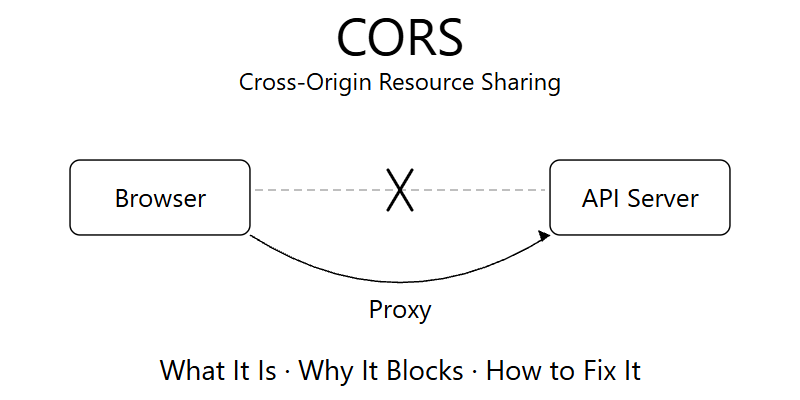
If you are building browser tools, AI or otherwise, you have run into CORS issues. If not, you will. Maybe you tried to pull Yahoo Finance data straight into a browser app, or download a file from GitHub or Google Drive into your web tool, and the browser just blocked it.
This post does two things. First, it explains CORS in plain words - what it is, why it blocks you, and the traps to avoid. Second, it gives you a complete, free fix: a copy-paste Cloudflare Worker that works as a CORS proxy - no server, no custom domain, free tier. The full Worker code is at the bottom of the post, with a one-line tweak to point it at Yahoo Finance or any API you need.
What is CORS?
When you download from a terminal (like using curl or python) - this always works. No restrictions.
But inside a browser (JavaScript code running in a web app) - there are restrictions. When your browser code tries to fetch data from another website (like Google Drive), that server must explicitly say "Yes, browsers are allowed to access this." They do this by including a special header in the response: Access-Control-Allow-Origin: *
This is CORS - Cross-Origin Resource Sharing. It's a browser security feature.
What's the problem?
Many services (e.g. Yahoo Finance, GitHub Releases, Google Drive, Dropbox etc) don't include this header. So your browser blocks your JavaScript from reading the response. It says: "Sorry, this server didn't give me permission to share this data with a browser."
Wait - does the data actually reach the browser?
Yes. This is the confusing part. The browser makes the request, the server sends the data back. The data actually arrives at your browser. But before handing it to your JavaScript code, the browser checks for that Access-Control-Allow-Origin header. If it's missing - your JavaScript can't touch the data. The browser's security layer sits between the network and your code.
Everything above applies to simple requests - basic GET requests that just read data. But for more complex requests - POST with JSON body, requests with custom headers like Authorization, PUT, DELETE - the browser does something different.
What is a preflight request? Before sending the actual request, the browser sends a lightweight OPTIONS request first. It asks the server: "Would you accept this kind of request from a browser?" If the server says yes (returns the right CORS headers), the browser sends the real request. If not, it stops right there. The real request never goes out. The data never arrives.
Why does the browser send a preflight? It's a safety check. A POST or DELETE can change data on the server - create records, delete data, trigger actions. The browser's logic: "Before I send something that could modify data on a server that might not be expecting browser requests, let me check first." This protects older APIs that were never designed to be called from random websites.
Can I disable it? No. The browser decides automatically. You cannot tell the browser "skip the preflight." It's not a setting or a flag in your code.
How does the browser decide when to send a preflight? Simple rules. The browser skips preflight (sends directly) if ALL of these are true: method is GET, HEAD, or POST; only standard headers (no Authorization, no custom headers); and if POST, content type is only form data or plain text. The moment you break any of these - say you add Content-Type: application/json or an Authorization header - the preflight happens automatically. Most modern API calls use JSON and auth headers, so most calls trigger preflight.
Does it slow things down? It's an extra round-trip but it's fast (just headers, no body) - you generally don't notice it.
The fix is the same either way - use a proxy. But now you know why sometimes you see that OPTIONS request in your DevTools Network tab before the actual call.
So where is the data sitting?
It's in the browser's network layer. The bytes came in, the HTTP response was parsed. But it's walled off from your JavaScript. Think of it like a customs officer who received your package but won't hand it to you because the paperwork (CORS headers) is missing.
Can I see it in DevTools?
Yes! This trips people up. Go to DevTools > Network tab, click the request - you can see the full response body with the actual data right there. You can read it. The browser has it.
But your fetch() call still throws a CORS error. DevTools has elevated privileges that bypass the same-origin policy. So you're staring at the data in DevTools while your code can't access it. Frustrating.
What's the solution?
You add a middleman - also called a Proxy. Instead of fetching directly from the offending API, your browser fetches from a proxy. The proxy fetches the data server-side (which always works - CORS is a browser-only restriction), then sends it to your browser with the proper CORS headers added. Your browser is happy, and you get your data.
CORS issues are fairly common when building browser-based apps. Knowing how to use a proxy to bypass CORS is an essential skill if you're building deployable apps and data tools.
When you hit a CORS error, you'll find suggestions online to add mode: 'no-cors' to your fetch call. It looks like a fix. The error goes away. But your data is gone too.
What no-cors actually does: it tells the browser "I know this will fail CORS, send it anyway but I accept that I can't read the response." The browser makes the request, gets the response, and gives you an empty opaque response. No data. No error either. Just nothing.
It's useful in very specific cases (like sending analytics pings where you don't care about the response), but for fetching data - it's a trap. The CORS error disappears but so does your data. Use a proxy instead.
How I handle it - and which one to pick when
Numerous ways to set up a proxy. I typically end up using one of these 3. Here's the order I think about them.
1. Cloudflare Workers - The Pure Proxy (Free. No Domain Required)
This is the simplest option for pure pass-through. Your browser calls the Cloudflare Worker, the Worker fetches from the actual API, adds CORS headers, sends it back. That's it. No domain needed - you get a free workers.dev subdomain. No server to manage. Free Cloudflare account is enough. You can also add authentication if needed.
Great for: any situation where you just need to pass data through without processing it. If the API you're calling works fine but just doesn't have CORS headers - this is the quickest fix. The complete copy-paste Worker code is at the bottom of this post - jump to The Complete Cloudflare Worker CORS Proxy. No second page needed. There is also a standalone text guide in the xlwings Lite Data Importer you can copy straight to your AI coder.
2. Vercel Serverless Functions - The Mini Backend (Free Tier)
This is a very nifty feature. If you have a React app on Vercel, you can create an api/ folder in your project. Any file inside api/ becomes a serverless function - essentially a mini backend endpoint. It runs on Vercel's servers, not in the browser. So no CORS issues because the request goes from Vercel's server (server-to-server), not from the browser.
It's like getting a mini FastAPI backend for free - except in JavaScript. You can do fair amount of processing there - not just proxy calls. Anything that can be done in JavaScript, you can do there. Data transformation, API orchestration, auth token handling.
The free tier gives you up to 12 serverless functions - more than enough for most apps. If you run into the limit, you can always combine functions. Execution timeout on free tier is currently up to 300 seconds (5 minutes) - so even long-running queries or heavier processing work fine.
For local development, you need the Vercel CLI (vercel dev) to run serverless functions locally - they won't work with just npm start since they need Vercel's runtime.
In my newer React apps, I've moved all API calls from the frontend to serverless functions. Everything goes through the server side. This adds an extra layer of security (API keys never exposed in browser code) and CORS issues are automatically taken care of. That's my default approach now.
Example: My IMDb Movie Explorer app. For source code hit 'Docs' on the app site (Press F9 if you don't see top menu).
3. FastAPI Backend - For Heavy Python Processing (Not Free)
This is not required for all cases. For simple pass-through requests, this is overkill - Cloudflare Workers or Vercel serverless handle that easily.
Where this makes sense: when you need serious Python processing that can't be done in JavaScript. Libraries like yfinance, pandas, numpy, scikit-learn - things that only exist in the Python ecosystem. Or when you already have a Python backend doing other things and you just want to add another endpoint.
Example: Yahoo Finance Data Extractor. A FastAPI backend that runs yfinance. Public and open. Pull Yahoo Finance data from any browser.
So which one do I pick?
Typically: if I'm building a React app, Vercel serverless functions are my first choice by default - everything goes through the server side. If something can't be done there (needs Python), I use my FastAPI backend. For standalone pass-through where I just need to proxy an API call quickly, Cloudflare Workers - doesn't even need a domain.
This catches people during development. Your React app runs on localhost:3000. Your backend runs on localhost:8000. Same machine. Same "localhost." But different ports. To the browser, these are different origins. So yes - you get CORS errors even when both are running on your own laptop.
That's why your FastAPI backend needs CORS middleware even during local development. In FastAPI you add CORSMiddleware with allow_origins=["*"] (or specific origins for production). Without it, your local frontend can't talk to your local backend. Same machine, different ports, different origins.
The Complete Cloudflare Worker CORS Proxy (Copy-Paste Code)
Here is the whole thing. This is the exact Worker I use. It is free, needs no custom domain (you get a your-name.workers.dev URL automatically), no server to manage, and it streams files of any size. You can have it live in a few minutes - or just paste this whole section to your AI coder and let it deploy for you.
How you call it
Once it is deployed, you call it by putting your target URL in a ?url= parameter (URL-encoded):
https://your-worker.workers.dev/?url=<encoded-target-url>
For Yahoo Finance, point it at Yahoo's JSON API endpoints. For example, to get the AAPL price chart in the browser without a CORS error:
https://your-worker.workers.dev/?url=https://query1.finance.yahoo.com/v8/finance/chart/AAPL
One thing to know about the code below: for safety it only allows a whitelist of domains - GitHub, Google Drive, and Dropbox (it was originally built for pulling data files into Excel / xlwings Lite). To use it for Yahoo Finance, just add Yahoo's domains to the ALLOWED_DOMAINS list near the top - add these three lines:
"query1.finance.yahoo.com",
"query2.finance.yahoo.com",
"finance.yahoo.com",
The same trick works for any API - add its domain to the whitelist and you are done. (If instead you want the full yfinance Python library - financials, fundamentals, holders, the works - that needs Python, so use the open FastAPI backend from option 3 above: Yahoo Finance Data Extractor. The Worker here is for hitting Yahoo's plain JSON endpoints directly from the browser.)
Two ways to deploy
Easiest - dashboard, no tools: go to dash.cloudflare.com and open Workers & Pages > Create > Create Worker. Give it a name, click Deploy, then Edit code. Delete the default code, paste the Worker code below, click Save and Deploy. Your URL shows at the top: https://your-name.workers.dev. That is it.
CLI - or let your AI coder do it: save the Worker code as github-proxy-auth-worker.js and the config as wrangler.toml in the same folder, then run:
CLOUDFLARE_API_TOKEN=your_token npx wrangler deploy --config wrangler.toml
The only credential you need is one Cloudflare API token with "Edit Cloudflare Workers" permission - create it at dash.cloudflare.com/profile/api-tokens using the "Edit Cloudflare Workers" template. A free Cloudflare account is enough (100k requests/day free).
The Worker code
Save as github-proxy-auth-worker.js:
/**
 * Cloudflare Worker: Unified Multi-Cloud File Proxy
 *
 * Purpose: Proxy file downloads to bypass browser CORS restrictions.
 * Supports both shareable links AND token-based private repo access.
 *
 * Supported Services:
 * - GitHub Releases (public and private repos)
 * - GitHub Raw Content (public and private repos)
 * - Google Drive (old and new 2024-2025 domains)
 * - Dropbox (shareable links and API)
 *
 * Features:
 * - Pure pass-through (no data stored/logged)
 * - Streams large files (no size limit due to streaming)
 * - Domain whitelist for security
 * - Adds CORS headers for browser compatibility
 * - Forwards Authorization header for private GitHub repos
 * - GitHub API-based download for private release assets
 *
 * Usage: https://your-worker.workers.dev/?url=<ENCODED_URL>
 *
 * For private repos, include Authorization header:
 *   Authorization: token ghp_xxxxx
 *
 * Examples:
 * - GitHub Public: ?url=https://github.com/user/repo/releases/download/tag/file.ext
 * - GitHub Private: Same URL + Authorization header
 * - Google Drive (old): ?url=https://drive.google.com/uc?export=download&id=FILE_ID
 * - Google Drive (new): ?url=https://drive.usercontent.google.com/download?id=FILE_ID&export=download&confirm=t
 * - Dropbox: ?url=https://www.dropbox.com/s/abc123/file.ext?dl=1
 */

// Allowed domains whitelist (add "query1.finance.yahoo.com" etc. for Yahoo Finance)
const ALLOWED_DOMAINS = [
  // GitHub
  "github.com",
  "api.github.com",
  "githubusercontent.com",
  "raw.githubusercontent.com",
  "github.io",
  "ghcr.io",
  // Google Drive (OLD and NEW domains)
  "drive.google.com",
  "drive.usercontent.google.com",  // NEW 2024-2025 domain for downloads
  "docs.google.com",
  "googleusercontent.com",
  "googleapis.com",
  // Dropbox
  "dropbox.com",
  "www.dropbox.com",
  "dl.dropboxusercontent.com",
  "dropboxusercontent.com",
  "content.dropboxapi.com"
];

addEventListener("fetch", event => {
  event.respondWith(handleRequest(event.request));
});

function isAllowedUrl(urlString) {
  try {
    const url = new URL(urlString);
    const hostname = url.hostname.toLowerCase();
    return ALLOWED_DOMAINS.some(domain =>
      hostname === domain || hostname.endsWith("." + domain)
    );
  } catch {
    return false;
  }
}

function getServiceName(urlString) {
  try {
    const url = new URL(urlString);
    const hostname = url.hostname.toLowerCase();
    if (hostname.includes("github") || hostname.includes("githubusercontent")) return "GitHub";
    if (hostname.includes("google") || hostname.includes("drive.google")) return "Google Drive";
    if (hostname.includes("dropbox")) return "Dropbox";
    return "Unknown";
  } catch {
    return "Unknown";
  }
}

/**
 * Convert GitHub release browser URL to API URL for private repos.
 * Browser URL: https://github.com/owner/repo/releases/download/tag/filename
 * API URL: https://api.github.com/repos/owner/repo/releases/tags/tag (to get asset ID)
 * Then: https://api.github.com/repos/owner/repo/releases/assets/{asset_id}
 */
function parseGitHubReleaseUrl(urlString) {
  try {
    const url = new URL(urlString);
    if (!url.hostname.includes("github.com")) {
      return { needsApiLookup: false };
    }

    // Match: /owner/repo/releases/download/tag/filename
    const match = url.pathname.match(/^\/([^\/]+)\/([^\/]+)\/releases\/download\/([^\/]+)\/(.+)$/);
    if (match) {
      return {
        needsApiLookup: true,
        owner: match[1],
        repo: match[2],
        tag: match[3],
        filename: match[4]
      };
    }
    return { needsApiLookup: false };
  } catch {
    return { needsApiLookup: false };
  }
}

/**
 * For private repos, we need to:
 * 1. Get the release by tag to find the asset ID
 * 2. Download the asset using the asset ID with Accept: application/octet-stream
 */
async function downloadGitHubReleaseAsset(owner, repo, tag, filename, authHeader) {
  // Step 1: Get release info to find asset ID
  const releaseUrl = `https://api.github.com/repos/${owner}/${repo}/releases/tags/${tag}`;

  const releaseResponse = await fetch(releaseUrl, {
    headers: {
      "Authorization": authHeader,
      "Accept": "application/vnd.github+json",
      "User-Agent": "CloudflareWorker-GitHubProxy/2.0"
    }
  });

  if (!releaseResponse.ok) {
    return {
      ok: false,
      status: releaseResponse.status,
      error: `Failed to get release info: ${releaseResponse.status} ${releaseResponse.statusText}`
    };
  }

  const releaseData = await releaseResponse.json();

  // Find the asset by filename
  const asset = releaseData.assets.find(a => a.name === filename);
  if (!asset) {
    return {
      ok: false,
      status: 404,
      error: `Asset '${filename}' not found in release '${tag}'`
    };
  }

  // Step 2: Download the asset using API URL with octet-stream Accept header
  const assetResponse = await fetch(asset.url, {
    headers: {
      "Authorization": authHeader,
      "Accept": "application/octet-stream",
      "User-Agent": "CloudflareWorker-GitHubProxy/2.0"
    },
    redirect: "follow"
  });

  if (!assetResponse.ok) {
    return {
      ok: false,
      status: assetResponse.status,
      error: `Failed to download asset: ${assetResponse.status} ${assetResponse.statusText}`
    };
  }

  return {
    ok: true,
    response: assetResponse,
    filename: asset.name,
    size: asset.size
  };
}

async function handleRequest(request) {
  // Handle CORS preflight
  if (request.method === "OPTIONS") {
    return new Response(null, {
      headers: {
        "Access-Control-Allow-Origin": "*",
        "Access-Control-Allow-Methods": "GET, OPTIONS",
        "Access-Control-Allow-Headers": "Content-Type, Authorization, Accept",
        "Access-Control-Max-Age": "86400"
      }
    });
  }

  // Only allow GET requests
  if (request.method !== "GET") {
    return new Response(JSON.stringify({ error: "Method not allowed" }), {
      status: 405,
      headers: {
        "Content-Type": "application/json",
        "Access-Control-Allow-Origin": "*"
      }
    });
  }

  // Get target URL from query parameter
  const url = new URL(request.url);
  const targetUrl = url.searchParams.get("url");

  // Return usage info if no URL provided
  if (!targetUrl) {
    return new Response(JSON.stringify({
      name: "Unified Multi-Cloud File Proxy",
      version: "3.0",
      error: "Missing url parameter",
      usage: {
        github_public: "?url=https://github.com/user/repo/releases/download/tag/file.ext",
        github_private: "Same URL + Authorization header: 'token ghp_xxxxx'",
        gdrive_old: "?url=https://drive.google.com/uc?export=download&id=FILE_ID",
        gdrive_new: "?url=https://drive.usercontent.google.com/download?id=FILE_ID&export=download&confirm=t",
        dropbox: "?url=https://www.dropbox.com/s/abc123/file.ext?dl=1"
      },
      supported: ["GitHub Releases (public/private)", "Google Drive (old & new domains)", "Dropbox"]
    }), {
      status: 400,
      headers: {
        "Content-Type": "application/json",
        "Access-Control-Allow-Origin": "*"
      }
    });
  }

  // Security: Only allow whitelisted domains
  if (!isAllowedUrl(targetUrl)) {
    return new Response(JSON.stringify({
      error: "Invalid URL - domain not allowed",
      allowed: ["github.com", "drive.google.com", "drive.usercontent.google.com", "dropbox.com"],
      hint: "Only GitHub, Google Drive, and Dropbox URLs are supported"
    }), {
      status: 400,
      headers: {
        "Content-Type": "application/json",
        "Access-Control-Allow-Origin": "*"
      }
    });
  }

  const serviceName = getServiceName(targetUrl);
  const authHeader = request.headers.get("Authorization");

  try {
    // Special handling for GitHub release URLs with authentication (private repos)
    // For private repos, direct download URLs don't work - need to use GitHub API
    const releaseInfo = parseGitHubReleaseUrl(targetUrl);
    if (releaseInfo.needsApiLookup && authHeader && serviceName === "GitHub") {
      // Use GitHub API to download the asset (works for private repos)
      const result = await downloadGitHubReleaseAsset(
        releaseInfo.owner,
        releaseInfo.repo,
        releaseInfo.tag,
        releaseInfo.filename,
        authHeader
      );

      if (!result.ok) {
        return new Response(JSON.stringify({
          error: result.error,
          status: result.status,
          hint: "Make sure the PAT has 'repo' scope for private repositories"
        }), {
          status: result.status,
          headers: {
            "Content-Type": "application/json",
            "Access-Control-Allow-Origin": "*"
          }
        });
      }

      // Build response headers with CORS
      const headers = new Headers();
      headers.set("Access-Control-Allow-Origin", "*");
      headers.set("Access-Control-Expose-Headers", "Content-Length, Content-Type, X-Proxy-Service, X-Proxy-Auth, X-Proxy-Method");
      headers.set("Content-Type", result.response.headers.get("Content-Type") || "application/octet-stream");
      headers.set("X-Proxy-Service", "GitHub");
      headers.set("X-Proxy-Auth", "yes");
      headers.set("X-Proxy-Method", "api-asset");
      headers.set("Cache-Control", "no-store");

      if (result.size) {
        headers.set("Content-Length", String(result.size));
      }

      // Stream the response body directly
      return new Response(result.response.body, {
        status: 200,
        headers: headers
      });
    }

    // Standard handling for other URLs (public GitHub, Google Drive, Dropbox)
    const fetchHeaders = {
      "User-Agent": "Mozilla/5.0 (Windows NT 10.0; Win64; x64) AppleWebKit/537.36",
      "Accept": "application/octet-stream, */*"
    };

    // Forward Authorization header if present (for private GitHub repos)
    if (authHeader && serviceName === "GitHub") {
      fetchHeaders["Authorization"] = authHeader;
    }

    // Forward Accept header if provided (for GitHub API octet-stream)
    const acceptHeader = request.headers.get("Accept");
    if (acceptHeader) {
      fetchHeaders["Accept"] = acceptHeader;
    }

    // Fetch from target (follows redirects)
    const response = await fetch(targetUrl, {
      method: "GET",
      redirect: "follow",
      headers: fetchHeaders
    });

    if (!response.ok) {
      return new Response(JSON.stringify({
        error: `Failed to fetch from ${serviceName}`,
        status: response.status,
        statusText: response.statusText,
        hint: response.status === 404 ? "File not found or private repo requires Authorization header" : undefined
      }), {
        status: response.status,
        headers: {
          "Content-Type": "application/json",
          "Access-Control-Allow-Origin": "*"
        }
      });
    }

    // Build response headers with CORS
    const headers = new Headers();
    headers.set("Access-Control-Allow-Origin", "*");
    headers.set("Access-Control-Expose-Headers", "Content-Length, Content-Type, X-Proxy-Service, X-Proxy-Auth");
    headers.set("Content-Type", response.headers.get("Content-Type") || "application/octet-stream");
    headers.set("X-Proxy-Service", serviceName);
    headers.set("X-Proxy-Auth", authHeader ? "yes" : "no");

    const contentLength = response.headers.get("Content-Length");
    if (contentLength) {
      headers.set("Content-Length", contentLength);
    }

    // Forward Content-Disposition if present
    const contentDisposition = response.headers.get("Content-Disposition");
    if (contentDisposition) {
      headers.set("Content-Disposition", contentDisposition);
    }

    // No caching to ensure fresh data
    headers.set("Cache-Control", "no-store");

    // Stream the response body directly (no buffering = no size limit)
    return new Response(response.body, {
      status: 200,
      headers: headers
    });

  } catch (error) {
    return new Response(JSON.stringify({
      error: "Proxy error",
      service: serviceName,
      message: error.message
    }), {
      status: 500,
      headers: {
        "Content-Type": "application/json",
        "Access-Control-Allow-Origin": "*"
      }
    });
  }
}
And the config, save as wrangler.toml in the same folder:
name = "github-proxy-auth"
main = "github-proxy-auth-worker.js"
compatibility_date = "2024-01-01"

# Custom domain routing (optional - configure after first deploy)
# Uncomment and edit if you have a custom domain:
# [[routes]]
# pattern = "github-proxy-auth.yourdomain.com/*"
# zone_name = "yourdomain.com"

# Enable logging for debugging
[observability.logs]
enabled = true
Private files too (GitHub)
For private GitHub repos, use the same proxy URL but add an Authorization: token ghp_xxxxx header (the PAT needs repo scope). The Worker spots GitHub release URLs and uses the GitHub API to fetch private assets - so the same one Worker covers both public and private.
If something breaks
- "Missing url parameter" - the
?url=is missing or not URL-encoded. - "Invalid URL - domain not allowed" - the target domain is not in
ALLOWED_DOMAINS. Add it (see the Yahoo Finance note above). - "Failed to fetch" with 404 - the file does not exist, or a private repo needs the Authorization header.
- "Not authenticated" when deploying - use the inline form
CLOUDFLARE_API_TOKEN=xxx npx wrangler deploy(the Windowssetcommand is unreliable here).
That is the whole thing. Copy it, deploy it, and your browser app can pull from Yahoo Finance, GitHub, Drive, or Dropbox without CORS errors.
Other Options (haven't used these - worth knowing about)
There are other solutions people use. Public CORS proxy services like allorigins.win and corsproxy.io let you just prepend their URL to your target URL - quick for testing but you're routing through someone else's server with no guarantees on uptime or rate limits. Not suitable for production. cors-anywhere is the original open-source Node.js proxy you can self-host - popular in tutorials, basically what the Cloudflare Worker above does, but you manage the server. cloudflare-cors-anywhere is the well-known Worker port of that same idea - if you searched for that and landed here, the Worker code above is exactly this approach written my way, so you run your OWN instance instead of leaning on a shared public proxy that can rate-limit or disappear. (Some of those forks expect a ?uri= parameter instead of the ?url= this Worker uses - same concept, just match whichever your deployment expects.) Browser extensions like "CORS Unblock" disable CORS checking entirely - fine for local dev, useless for production since your users won't have it installed. Nginx/Caddy reverse proxy can also forward requests and add CORS headers - but if you already have a FastAPI backend, this is redundant. Your backend already handles it.
Best Way to Use This
Just copy paste this post to your AI Coder. It will explain the differences and trade-offs and applicability for your specific apps. It can clone the repos and guides if you ask it to - but not really required. This is straightforward stuff for them. They know it blind.
Infra Guide Series
The full "Infra Guide for AI Tool Builders" series:
- Part 1: AI Coder - Claude Code across the full build-to-deploy chain
- Part 2: Deployment & Hosting - Hetzner, Coolify, Vercel, Cloudflare
- Part 3: The 18 Common Security Mistakes (and Fixes) - production security hardening
- Part 4: Free CORS Proxy - Cloudflare Worker Code - copy-paste Worker to bypass CORS
- Part 5: Perimeter Security on Cloudflare (Free Plan) - edge defense, WAF, rate limits, honeypots
Working on something similar? How I work covers the rates, the availability and what I take on.