Upstash Redis on Vercel - The Tool I Didn't Know I Needed
Published: March 10, 2026
It's like a Python dictionary that lives on a server, remembers things across requests, and cleans itself up. Useful for rate limiting, caching, and many other stuff.
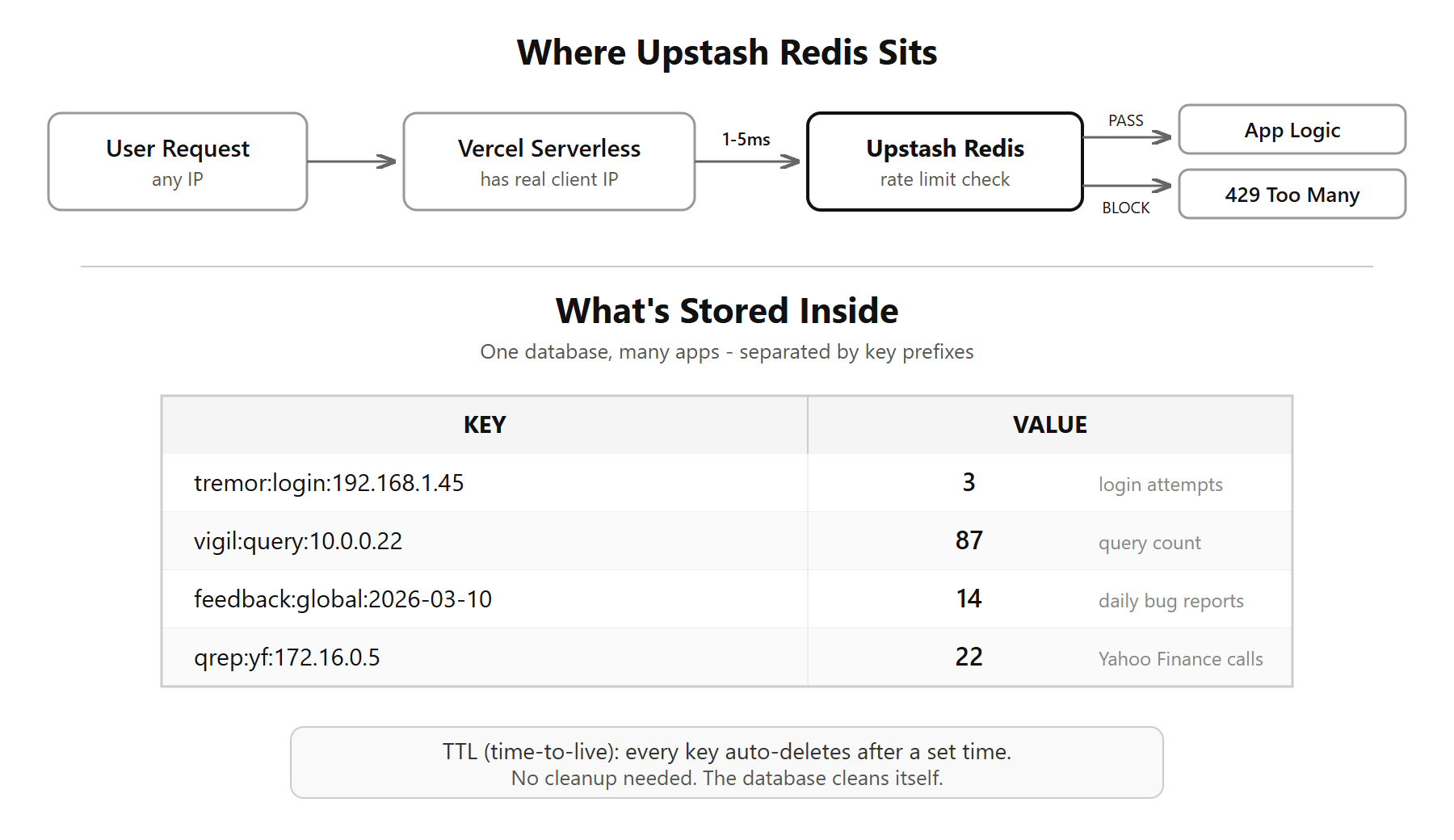
I come from data science - two years into building full-stack AI tools, my apps kept getting hammered. Bots, scrapers, someone just deciding to hit an endpoint a thousand times. The serverless functions on Vercel were taking the hits directly - and if any of those functions talked to a paid API, that's money going out while I'm asleep.
Rate limiting was the obvious fix. But there's a problem with serverless functions - they forget everything after each request. Every time one runs, it starts fresh. No memory of who called it before, how many times, or when. So how do you tell it "this IP has already made 5 requests in the last 15 minutes, block the 6th"?
You need something external to hold that thing...that's what led me to Redis / Upstash.
What is Redis, and how is it different from a database?
Redis is a key-value store. Not a database with tables and columns - just keys and values. Think of it like a Python dictionary that lives on a server, in memory, and responds in under a millisecond.
The simplest way to understand it is to just look at what's actually stored:
KEY                                VALUE
─────────────────────────────────  ─────
login_attempts:192.168.1.45        3
login_attempts:10.0.0.22           1
feedback:global:2026-03-10         14
vigil:query:172.16.0.5             87
That's it. That's the whole structure. Each row is one entry - a name (the key) and a value. No tables, no columns, no schemas. The key is a string. The value can be a string, a number, a list, or a set. Everything lives in RAM, not on disk. That's why it's fast - reads take under a millisecond vs 50-200ms for a typical Postgres query.
There's one important thing that makes Redis genuinely different: you can set a TTL (time-to-live) on any key. Means "remember this for X seconds, then auto-delete." So when someone from IP 192.168.1.45 hits your login endpoint, you create a counter for that IP and tell Redis to forget it after 15 minutes. Every attempt increments the counter. After 5 attempts - blocked. When 15 minutes are up, the key vanishes on its own. No cleanup code, no cron jobs. Redis handles it.
That's the thing that makes it very useful for rate limiting.
Why not just use Postgres for this?
My first instinct was to create a rate_limits table in my existing Neon Postgres. Three reasons I didn't:
Latency. Postgres takes 50-200ms including connection setup. Redis over HTTP takes 1-5ms. Rate limit check runs on every single request before any other logic. That difference adds up fast across multiple apps.
Auto-expiry. In Postgres, I'd need a cleanup job - "delete all rate limit rows older than 15 minutes." In Redis, I set a TTL and it disappears by itself.
Overhead. Another connection string, another schema, another thing to monitor. Upstash on Vercel is literally two environment variables. No migrations, no connection pooling config.
What is Upstash?
Traditional Redis requires a running server - install it, configure it, keep it alive. If the whole point of using Vercel is to avoid managing servers, running your own Redis defeats the purpose.
Upstash is Redis-as-a-service built for serverless. Speaks HTTP (REST API), so it works from any serverless function without persistent connections. On Vercel, it's a first-class integration - click a button in the dashboard, it provisions a Redis instance and injects two environment variables: KV_REST_API_URL and KV_REST_API_TOKEN. That's it, you're connected.
For small apps and indie projects, a managed service like Upstash makes sense. You don't want to manage infrastructure for a rate limiter. Large-scale setups with dedicated DevOps teams might prefer their own Redis cluster for control and cost at volume. But for building and shipping tools fast, Upstash is to Redis what Vercel is to hosting.
Many apps, one database
I have some 10-12 apps using the same single Upstash instance. Did not create 12 databases. Created one.
Redis is a flat namespace - no tables, no schemas. The trick is key naming. Each app uses a prefix:
tremor:login:192.168.1.45        → 3
vigil:query:10.0.0.12            → 87
feedback:global:2026-03-10       → 14
qrep:yf:172.16.0.5               → 22
Same database, same env vars, keys never collide because of the prefix. Like separate folders inside one filing cabinet. The free tier allows up to 10 databases, but for rate limiting there's no need to split - just use prefixes. Keys self-organize and auto-expire. The database essentially cleans itself.
Free Tier - What You Get
- 500,000 commands/month - roughly 16,000/day. Each rate limit check is 2-3 commands. Across 10-12 apps with moderate traffic, I've never come close.
- 256 MB storage - way more than needed when keys auto-expire. My entire rate limiting dataset across all apps is probably a few kilobytes at any given moment.
- 1 free database - up to 10 total, additional ones at $0.50/month each.
How it works for my rate limiters
A note before the implementation: rate limiting needs to happen at multiple layers
This section covers rate limiting at the serverless function layer on Vercel. But depending on your app architecture, you need it in more places - at the Cloudflare edge, at your FastAPI backend, and here at the serverless layer. Each layer uses a different IP source and a different tool. And the IP itself is a trap - the wrong header gives you a spoofable value, not the real client IP.
I go deep into all of that in a separate post: Are You Rate Limiting the Wrong IPs?
This section is specifically about the serverless layer - where Upstash Redis fits in.
When a request comes in:
- Extract the client IP (Vercel gives you this in its own headers - the real TCP/IP connection IP, not the spoofable
X-Forwarded-Forheader) - Build a key like
app:endpoint:192.168.1.1 - Increment the counter in Redis
- Set TTL so it auto-expires
- If count exceeds threshold, return 429
What this looks like across my apps:
- Bug report endpoint - 5 per 15 minutes per IP, global cap of 50/day across all users
- AI feedback endpoint - 10 per hour per IP
- Login pages - 5 attempts per 15 minutes. Fail past that, IP gets blocked in Redis until admin unblocks
- DuckDB query proxies - 200 requests per 60 seconds per IP
- Yahoo Finance proxies - 60 per minute per IP
- Image uploads - 15 per hour per IP
Every implementation uses fail-open. If Redis is down, the request goes through. You don't want your entire app to break because the rate limiter is temporarily unavailable.
What Else Can You Do With It
I'm only using it for rate limiting right now. But there's a huge amount more it can do...I haven't used these, but here are some common uses I can think of:
API response caching. Run a heavy SQL query or hit an expensive API. Cache the result in Redis with a 5-minute TTL. Next request gets the cached result instantly instead of waiting 3 seconds.
Session storage. Store user sessions without a database table. Key is the session token, value is the user object. TTL handles expiry. No session table to manage.
Feature flags. Roll out a new feature to 10% of users. Store the flag in Redis. Change it instantly without redeployment.
Real-time leaderboards. Redis sorted sets maintain rankings automatically. Add a score, Redis keeps the order. Could be useful for analytics dashboards showing top-performing funds or stocks.
Sliding window analytics. Track events in a time window - "how many API calls in the last 60 seconds" with sub-second precision. Same pattern as rate limiting, but pointed at usage dashboards and monitoring.
Configuration store. Store app config that changes often - API endpoints, threshold values, toggle switches. Read from Redis, update without redeployment.
The Bigger Picture
The pattern is always the same: set a key, check a key, let it expire. Whether rate limiting, caching, or tracking - same three operations. Once you get that, you start seeing where it fits.
500,000 monthly commands, 256 MB storage, no server to manage, sub-millisecond response times - on the free tier. For the kind of tools I build, that's more than enough.
Working on something similar? How I work covers the rates, the availability and what I take on.