Are You Rate Limiting the Wrong IPs? A SlowAPI Story.
Published: March 6, 2026
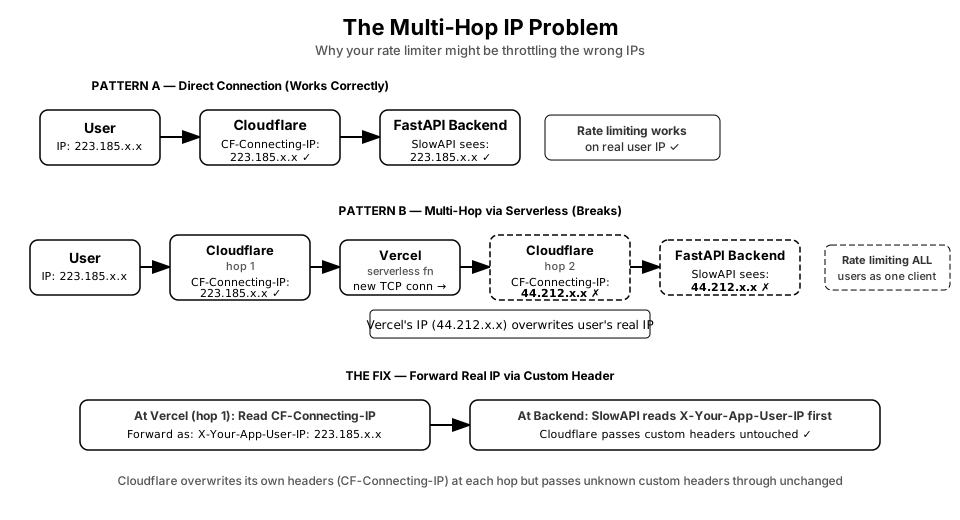
Quick version: You need to make sure that the 'real IP' is being picked up by your rate limiter e.g SlowAPI in Python. And if your app has layers between the user and your backend server - which most modern apps do - there's a good chance your rate limiter is working on the wrong IP address. Meaning you could be throttling your entire user base thinking it is one bad actor. Rest of this post explains how that happens and what the fix looks like. And same concept applies if you are capturing IPs for security purposes
What is Rate Limiting and Importance of 'Real IP'
Rate limiting is basically a bouncer for your API. You tell it: allow max 10 requests per minute from any single user. If someone hits you 50 times in a minute, block them for a bit.
But how does the bouncer know who is who? It uses the IP address. Every device on the internet has an IP, like a return address on a letter. So the bouncer says: this IP has sent 10 requests already, block it.
SlowAPI is a popular Python library that adds this rate limiting to FastAPI backends. Easy to set up, works well. But there is a catch with how it figures out the IP address.
By default, SlowAPI uses a built-in function called get_remote_address. And what does that read? X-Forwarded-For. A header - basically a note passed along with every web request. But most people just install it and move on. The problem is X-Forwarded-For can be wrong, or it can be faked. Which one depends on your setup. If you want the real TCP IP and there is no proxy in front, one of the simple methods you can use - request.client.host directly as your key function - that is the actual socket-level IP and cannot be faked. But the moment any proxy sits in front, that gives you the proxy's IP, not the user's.
How I Found Out Something Was Wrong
I run around 30 FastAPI backends for tigzig.com, all recently moved behind Cloudflare. I had already addressed the X-Forwarded-For issue and was extracting IP from CF-Connecting-IP - the header Cloudflare sets from the actual TCP connection. Seemed like a simple setup. Should be fine.
For ~25 of my backends, it was fine.
For the other 5, I was rate limiting Vercel's AWS data center IPs. Not actual users. Every single request from hundreds of different real users was showing up as coming from the same 3-4 IP addresses - Vercel's servers sitting somewhere in Virginia.
My rate limiter was treating my entire user base as one client.
I found this by accident while digging through traffic patterns. The app was working. Rate limiting was working. Just on completely the wrong thing.
Why This Happens - The Multi-Hop Problem
When a user opens your app and clicks something, a request goes out. Simple setup: user's browser -> Cloudflare -> your backend.
But in many modern setups it is not that simple. The request makes multiple stops. In my case: user's browser -> Cloudflare -> Vercel serverless function -> Cloudflare again -> my FastAPI backend.
That second Cloudflare stop is where things break.
Cloudflare sets CF-Connecting-IP based on who it directly sees making the TCP connection. At the first hop it sees the user's browser. CF-Connecting-IP is the real user IP. Correct.
But when the Vercel function calls my backend, that is a fresh new TCP connection. And now Cloudflare at the second hop sees Vercel's server. So CF-Connecting-IP gets overwritten with Vercel's IP. By design, not a bug.
So my backend reads CF-Connecting-IP thinking it is the real user. And it is - just the wrong user. It is Vercel.
This happens with any serverless layer - Vercel, Netlify, AWS Lambda, Google Cloud Functions. If there is a server-side layer making calls to your backend, and Cloudflare is in front of both, the backend sees the platform's IP, not the user's.
How to Verify if This is Happening to You
Very simple. No special tools.
Google "what is my IP" and note it down. Open your app in the browser, do something that hits your backend, then check what IP your backend logged for that request.
If they match - you are fine.
If your backend logged some AWS or GCP IP instead of yours - you have the multi-hop problem.
I verified my fix by checking the headers stored in my logging database. Before the fix, CF-Connecting-IP was showing 44.212.93.133 - Vercel's AWS Virginia server. After the fix I was seeing real Indian IPs of actual users.
The Fix
Since Cloudflare overwrites its own headers at every hop but passes through unknown custom headers untouched, the fix is straightforward.
In the Vercel serverless function - where CF-Connecting-IP is still correct because it is the first Cloudflare hop - read the real user IP and forward it as a custom header with a name Cloudflare does not recognise. Something like X-Your-App-User-IP. Cloudflare will pass it through without touching it.
Then in your SlowAPI key function, read that custom header first:
def get_real_client_ip(request: Request) -> str:
    # 1. Custom header forwarded from your serverless layer
    custom_ip = request.headers.get("x-your-app-user-ip", "")
    if custom_ip:
        return custom_ip.strip()

    # 2. Direct Cloudflare connection (no serverless hop)
    cf_ip = request.headers.get("cf-connecting-ip", "")
    if cf_ip:
        return cf_ip.strip()

    # 3. Last fallback
    if request.client:
        return request.client.host
    return "127.0.0.1"

limiter = Limiter(key_func=get_real_client_ip)
The order matters. Custom header first, then CF-Connecting-IP, then direct TCP as last fallback.
Unfortunately there is no shortcut here - for each backend where this is a problem, you need to update the middleware and redeploy. One backend at a time. Not fun, but it is a one-time thing and the fix itself is small.
FAQ
Is X-Forwarded-For easily spoofed?
Very easily. Anyone can run:
curl -H "X-Forwarded-For: 8.8.8.8" https://your-api.com/endpoint
If your SlowAPI is reading X-Forwarded-For and there is no trusted proxy enforcing the value, an attacker can just rotate that header with every request and your rate limiter sees a different 'user' each time. Rate limiting completely bypassed. This is the most common real-world IP spoofing thing you will see - not exotic TCP-level attacks, just this.
What if there is no proxy at all? Just my backend directly on the internet, no Cloudflare, no serverless?
Then use request.client.host. This is the real TCP IP, straight from the connection your server actually sees. Cannot be spoofed because it requires a completed TCP handshake from that IP address. If you are in this setup and you are using SlowAPI's default get_remote_address (which reads X-Forwarded-For), switch to request.client.host directly. It is more reliable.
What if I have no Cloudflare but I do have a serverless layer?
Same multi-hop problem, just without Cloudflare. The serverless function makes a fresh TCP connection to your backend. request.client.host gives you the platform's IP, not the user's. You still need the custom header forwarding approach - read the real IP at the serverless layer and pass it forward in a custom header. The Cloudflare piece is not what causes the problem. Any proxy layer in between causes it.
Why can't my backend just read the TCP IP directly the same way Cloudflare does?
It can - but only if the browser connects directly to your backend with no proxy in between (see question above). The moment any proxy sits in the middle, your backend's TCP connection is with that proxy, not the browser. The proxy terminates the user's connection on its end and makes a new one to you. So at TCP level, your backend only ever sees the proxy's IP. Cloudflare can see the real user TCP IP because they are the first in the chain - the browser's TCP connection ends there. Your backend is further back.
I have a reverse proxy like Caddy or nginx (e.g if you are using Coolify) in front of my FastAPI. Does that change things?
Yes, and this is worth understanding. I ran into this myself - my backends on Hetzner run on Coolify - behind Caddy inside Docker. So even the "direct TCP IP" is not the user's IP anymore. request.client.host gives 172.18.0.10 - the internal Docker/Caddy IP, not the user.
Here is what I actually saw when I tested both setups:
Without Cloudflare (grey cloud - direct browser to Hetzner):
request.client.host  ->  172.18.0.10       (Caddy's internal Docker IP)
cf-connecting-ip     ->  null               (no Cloudflare, so this header doesn't exist)
x-forwarded-for      ->  223.185.131.108   (real user IP, Caddy set this from the TCP it saw)
With Cloudflare (orange cloud - browser to Cloudflare to Hetzner):
request.client.host  ->  172.18.0.10       (still Caddy, always Caddy)
cf-connecting-ip     ->  223.185.131.108   (real user IP, set by Cloudflare)
x-forwarded-for      ->  172.70.93.35      (Cloudflare's internal edge IP, not the user)
So with Caddy + Cloudflare, CF-Connecting-IP is the right one to read. With Caddy but no Cloudflare, X-Forwarded-For is actually correct because Caddy sets it from the real TCP connection it sees. Without any proxy at all, request.client.host is correct.
Bottom line: request.client.host is only 'the real IP' when there is literally nothing in front of your FastAPI process. The moment any proxy - Caddy, nginx, Docker networking, Cloudflare - sits in between, it gives you that proxy's IP.
Can someone fake CF-Connecting-IP by sending it as a header directly?
Not through Cloudflare. Cloudflare always overwrites CF-Connecting-IP with the real TCP source, so anything a client tries to inject gets replaced. I tested this - sending a fake CF-Connecting-IP header through Cloudflare does nothing, the real IP comes through.
But without Cloudflare in front, yes - someone can just send CF-Connecting-IP: 7.7.7.7 in their request and if your code reads that header blindly, you will log and rate limit 7.7.7.7 instead of their real IP. So never read CF-Connecting-IP as a trusted header unless you are actually behind Cloudflare.
Is CF-Connecting-IP completely unfakeable?
For practical purposes yes. Cloudflare sets it from the TCP source address and you need a real completed three-way handshake for that. An attacker cannot just inject a fake CF-Connecting-IP header - Cloudflare overwrites it with the real TCP source.
And my friend, if you have to worry about a TCP-IP level IP spoofing with Cloudflare, you shouldn't be doing this DIY and probably have bigger problems in life to worry about than rate limiting a deployed tool
The real risk is different - if someone finds your origin server's direct IP and connects to it bypassing Cloudflare entirely, CF-Connecting-IP won't even exist in the request. Fix for that is Cloudflare Authenticated Origin Pulls combined with firewall rules that only allow connections from Cloudflare's IP ranges. But that is a separate topic.
Do I need to do anything for my backends that are not behind a serverless layer?
If they are directly behind Cloudflare with no serverless hop in between - switch your SlowAPI key function to read CF-Connecting-IP instead of X-Forwarded-For. That is the right header in a direct Cloudflare setup. If you are running without any proxy at all, use request.client.host. Either way, don't rely on the SlowAPI default.
I have a detailed security checklist for web apps - 95 items across React, FastAPI, Postgres, DuckDB, Cloudflare, MCP servers, Auth and VPS security. Each item in plain English with code fixes. You can download it as markdown and paste it directly to your AI coder.
Working on something similar? How I work covers the rates, the availability and what I take on.