Infra Guide for AI Tool Builders - Part 5: Set Up Perimeter Security (Edge Defense) for Your Apps on Cloudflare's Free Plan
Published: March 3, 2026
Previous posts covered frontend, backend, and database security. This one is about what happens before traffic even reaches your server. Edge defense. Perimeter security. The stuff that sits between the internet and your application.
If you come from an analyst or data science background like me — building tools and small apps for businesses — you may not know about Cloudflare capabilities. I didn't. Even on the free plan, the amount of security and non security functionalities it offers is huge. And it costs nothing.
Here's what I'm running across 60+ subdomains and 40+ deployed apps. All on the free tier.
Just note that, with Cloudflare tokens, your AI Coder (Claude Code, Cursor etc) would be able to do any / all of this for you.
Orange Cloud Everything
First thing. When you add a domain to Cloudflare, every DNS record gets a toggle — orange cloud (proxied) or grey cloud (DNS-only). Orange cloud means traffic flows through Cloudflare. Grey cloud means traffic goes directly to your server, bypassing everything. Every domain that can be orange-clouded should be. The exceptions are third-party CNAMEs — Auth0, Clerk, AWS RDS — those need grey cloud because the third-party service requires direct resolution.
One issue I faced here - It has a 100 seconds time out. For my longer running backends - they are temporarily on grey cloud as I migrate to a polling system .. i.e my backend will send a job ID and I'll poll the completion endpoint from my frontend with that job ID.
Important thing is - know exactly which domains are grey and why. I maintain an audit list. Everything else — orange.
JS Challenge on Frontend Domains
Cloudflare gives you 5 free custom WAF (Web Application Firewall) rules. One of mine applies a JavaScript challenge to most of my frontend tools. What this does — when a request hits your site, Cloudflare injects a lightweight JS snippet that the browser solves transparently. Users barely even notice. But automated scanners, bots, and curl scripts can't solve it. They get blocked before touching your app.
But here's an issue I faced- tigzig.com is an AI Agent first site with the all domains assets available as text and markdown files and indexed via llms.txt. But with JS Challenge I suddenly saw a drop in AI Agent hits, even though the llms.txt and other assets were excluded from the challenge and were fully accessible. My hypothesis - AI Agents skip the site without bothering to check for llms.txt if they hit a JS challenge on main domain. And as soon as I removed the JS Challenge, they came happily back.
Browser Integrity and Security Level
Free settings. Browser Integrity Check catches requests with fake or missing User-Agent headers. Security Level set to High makes Cloudflare challenge IPs with bad reputation scores. Two toggles. Takes 30 seconds.
The Rate Limit Problem
Cloudflare's free WAF gives you one rate limit rule. One threshold across your entire zone. But a frontend React app could send anywhere from 20-40 requests on page load — JS bundles, CSS, images, API calls. For backend API, it's much lesser as it receives only the calls from frontend. So you need different rate limits for frontend and backends.
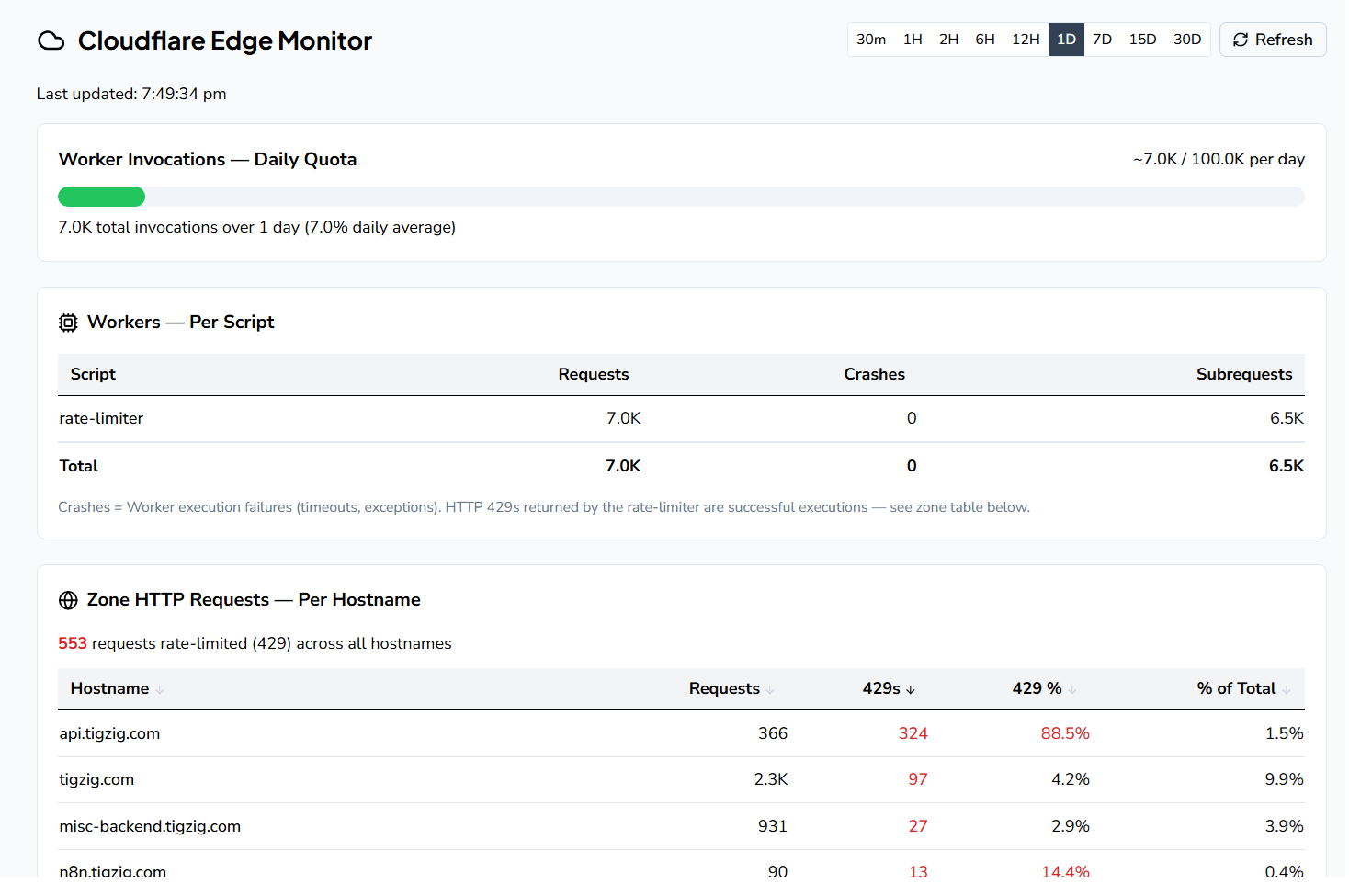
This is where Cloudflare Workers come in. Free plan gives you 100,000 invocations per day. You upload a small script that runs at the edge — before traffic reaches your server. My Worker checks the incoming domain against a config map and applies different rate limits:
- Frontends: higher limit - handles page load plus a few refreshes
- Backends: lower limit - pure API, no page loads
- MCP servers: medium limit - as AI agents can shoot off queries fast
- Catch-all: medium limit for any that might remain unconfigured
One Worker. One deployment. Different limits per domain and even per path. When the limit is hit, Cloudflare returns a 429 at the edge. The request never reaches your server. Your AI coder can write and deploy this — it's a single JavaScript file with a configuration map.
And you can monitor your 429 rejects on Cloudflare dashboard and calibrate limits after having your AI Coder investigate their payload. I monitor this using a custom dashboard.
Is the 100K invocations enough?
It looks like a big number but actually not so. Try this - next time you deploy a new app - check the number of requests at Cloudflare. Within first day you'll see thousands of hits on Cloudflare even without a single page view on your web analytics dashboard. Why? All automated bot scanners doing vulnerability scans. For a large public facing app, that's a drop in the ocean. For internal tools for small businesses, that might work....it all depends on what all you got in that particular zone. So yes, monitoring your free quota usage is important.
What if you run out of free quota? Then there is option of Workers paid plan of $5 p.m which covers 100 million requests/month + $0.30 per additional million.
Free tier is also limited to 10ms CPU time (not wall clock time) per request. For rate limit checks - domain lookup, config match, counter comparison - that's more than enough.
You need to monitor usage. A single bot storm could eat through that quota fast.
Zone-Level IP Blocking
When you spot a malicious IP in your logs — vulnerability scanners, credential stuffers, path traversal attempts — you can block the entire IP range at the Cloudflare zone level (either a single IP or an entire subnet say, 256 addresses owned by the same provider). One API call. Applies across all subdomains instantly. I have blocked a few ranges from a bulletproof hosting provider (hosting provider known for harboring malicious traffic) after they hit my MCP server with .env hunting and malicious file upload attempts. Every request from those IP ranges now gets dropped at the edge. Zero impact on my servers. This is only as an exception. You can't really keep blocking IPs as they get rotated. The scalable way is rate limits, JS challenges etc as well as hardened & non-leaky backends. But good to know in case you do need to do that.
Quick Info — IP Address Blocks (CIDR Notation)
In IP addressing, ranges are expressed as "blocks" using CIDR notation:
A /32 is a single IP (1 address)
A /24 is a block of 256 addresses (last number varies: 185.177.72.0 to 185.177.72.255)
A /16 is a block of 65,536 addresses (last two numbers vary)
So in one of my cases I put up a /24 block (256 IPs). In this case the attacker owned two /24 blocks (512 IPs total), so blocking both /24s covered their entire operation. You're not blocking the whole internet — just a specific slice you've identified as malicious. But again, as mentioned earlier, this level of blocking is more of an exception than the norm.
Vercel .vercel.app Bypass
If you're on Vercel, every app gets a public something.vercel.app URL alongside your custom domain. This URL bypasses Cloudflare entirely — all your edge rules become useless. Fix: enable Deployment Protection in Vercel settings. Any access to the .vercel.app URL goes to Vercel's sign-in page. One toggle. Matter over.
What Comes After the Edge
Once traffic passes through Cloudflare, it hits your server. That's where the other 80+ items in my security checklist kick in — frontend hardening, backend rate limits, SQL validation, API key auth, database read-only roles, and so on. The edge is the first gate.
My full security checklist — 95 items across React, FastAPI, Postgres, DuckDB, Cloudflare, MCP servers, VPS, and auth — is at tigzig.com/security. Each of these detected in my own apps and in process of fixing. There's a copy-to-markdown button. Paste it to your AI coder and have it walk through your app. Or use it as a starting point and customize.
Total cost of everything above: $0. All on Cloudflare's free tier. The only cost is the time to set it up - and your AI coder handles nearly all of that.
Security Checklist for Web Apps — Check list here: 95 items, all practical stuff tigzig.com/security
Post here: Security Checklist for Web Apps
MCP Server security with OAuth & hardened backends: Talk to Your Database from Excel - Part 2
Infra Guide Series
The full "Infra Guide for AI Tool Builders" series:
- Part 1: AI Coder - Claude Code across the full build-to-deploy chain
- Part 2: Deployment & Hosting - Hetzner, Coolify, Vercel, Cloudflare
- Part 3: The 18 Common Security Mistakes (and Fixes) - production security hardening
- Part 4: Free CORS Proxy - Cloudflare Worker Code - copy-paste Worker to bypass CORS
- Part 5: Perimeter Security on Cloudflare (Free Plan) - edge defense, WAF, rate limits, honeypots
Working on something similar? How I work covers the rates, the availability and what I take on.